
Wallets & Security
SafePal S1
$59.99
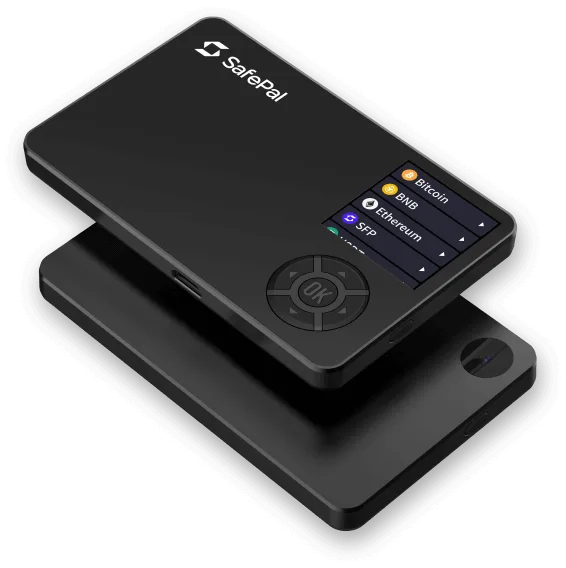
The SafePal S1 is a hardware wallet that keeps your keys offline and signs transactions only by scanning QR codes. It has no Bluetooth, Wi-Fi, NFC, or USB data connection, and works with the SafePal App. Its 1.3-inch screen and camera handle the QR-code step.
Buy Now opens the secure checkout preview. No payment is taken in demo.
Added — view cart
What it does
An air-gapped hardware wallet about the size of a credit card. Air-gapped means it has no data connection at all for signing — no Bluetooth, no Wi-Fi, no NFC and no USB data link. Instead it talks to its companion app only through QR codes: the app displays a QR code, the device scans it with its built-in camera and signs offline, then the device displays a signed QR code for the app to scan and broadcast. Private keys stay inside the device, on a certified secure chip.
Feature coverage:
- Fully offline signing by QR code in both directions.
- A true random number generator and multiple layers of security sensors.
- An anti-tampering self-destruct mechanism, plus device authentication, PIN and passphrase protection.
- The essential code for private-key generation and other core security functions is published for independent review.
- Manages an unlimited number of tokens across 200+ blockchains in one device, through the companion app and a browser extension, where transactions are authorised on the hardware device.
- In-app services such as cross-chain swaps and a gateway to decentralised apps are available through the companion app, where offered.
How it's used
- Unbox the device and install its companion app on your phone from a trusted source.
- Power on the device, choose create a new wallet, and follow the on-screen setup.
- Set a PIN, and add a passphrase only if you understand that a forgotten passphrase cannot be recovered.
- Write down the recovery phrase exactly as shown, on the supplied phrase cards or a metal backup, and store it offline.
- Pair the device with the app by scanning the pairing QR code as prompted.
Everyday use: to receive, generate an address in the app and check it on the device. To send, build the transaction in the app, let the device scan the app's QR code with its camera, review and confirm on the device, then hold the device's signed QR code up for the app to scan. Recharge the battery with the USB cable as needed — the cable is for charging and updates, not for signing data.
Key specs
- Connectivity: QR codes only — no Bluetooth, Wi-Fi, NFC or USB data connection; fully air-gapped signing
- Screen: 1.3-inch full-colour display, 320 x 320 px
- Camera: built-in, for high-speed QR code scanning
- Secure element: certified CC EAL6+, with true random number generator
- Protection: PIN and passphrase, anti-tamper self-destruct mechanism, device authentication, multiple security sensors
- Battery: 400 mAh rechargeable
- Body: ABS and PVC
- Controls: D-pad
- Firmware: supports firmware upgrades
- Asset support: 200+ blockchains, unlimited tokens, via its companion app and browser extension
- In the box: not itemised for this model
Good to know
Signing is deliberately slower than a cable or Bluetooth wallet, because every transaction moves by QR codes scanned in both directions — that trade-off is the point of an air-gapped design. The hardware line carries a one-year warranty from the date the device is activated. Only part of the device code is published, not the complete code — buyers who require fully open-source firmware should weigh that. Keep the recovery phrase offline; the self-destruct mechanism means tampering attempts can wipe the device, after which the phrase is the only way back in.